SWR Power Meter for Yaesu FT-857/FT-897

R774,00
+ R97,99 Shipping

SWR Power Meter for Yaesu FT-857/FT-897

  • Brand: Unbranded
Sold by:

SWR Power Meter for Yaesu FT-857/FT-897

  • Brand: Unbranded

R774,00

Save R525,00 (40%)

RRP

R1 299,00
In stock
+ R97,99 Shipping

14-Day Returns Policy

Sold by:

R774,00

Save R525,00 (40%)

RRP

R1 299,00
In stock
+ R97,99 Shipping

14-Day Returns Policy

Payment methods:

Description

SWR Power Meter for Yaesu FT-857/FT-897

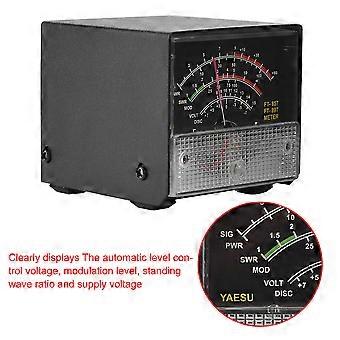
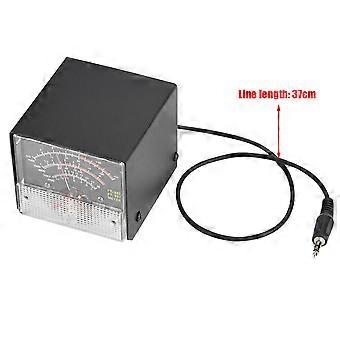
Welcome to our shop! This external multi-function expansion meter is designed specifically for Yaesu FT-857D and FT-897 radios. It features high performance and super stability, allowing you to effectively detect and understand your Yaesu radio and improve your work efficiency. The meter clearly displays the automatic level control voltage, modulation level, standing wave ratio, and supply voltage. It is made with high quality materials and excellent durability, ensuring long-lasting use. Additionally, it is easy to operate, making it convenient for users. The meter weighs 300g and has a size of 6.7*7*6cm. The line length is 37cm and it comes in black color. Package List: - 1 * External S Meter Display Meters for Yaesu FT-857/FT-897 To set up the external header display for FT-857D and FT-897D radios, follow these steps: 1. Press the (FUNC) key to enter the setup menu and enable the extended menu. 2. Rotate the (SELECT) knob to call up the setup menu item No-061 (MTR ARX SEL). 3. Rotate the (DIAL) knob to select the desired external instrument display, such as signal strength, discriminator center meter, battery voltage, etc. 4. Press the (FUNC) button to save the settings and exit the setup menu. For emission display settings, follow these steps: 1. Press the (FUNC) key to enter the setup menu and enable the extended menu. 2. Rotate the (SELECT) knob to call up the setup menu item No-061 (MTR ARX SEL). 3. Rotate the (DIAL) knob to select the desired external instrument display, such as transmit power, automatic level control voltage, modulation level, SWR, etc. 4. Press the (FUNC) button to save the settings and exit the setup menu. To calibrate the meter, follow these steps: 1. Press the (FUNC) key to enter the setup menu and enable the extended menu. 2. Rotate the (SELECT) knob to call up the setup menu item No-060 (MTR ARX SEL). 3. Rotate the (DIAL) knob to select FS. 4. Use a small flathead screwdriver to adjust the calibration adjustment hole at the rear of the meter until the pointer reaches full scale. 5. The calibration is complete! Please note that the meter has been calibrated before delivery, but there may be instances where the static pointer is not zero due to bumps during transit. In such cases, the instrument can be adjusted by using the self-zeroing screws on the mask side. 100% Satisfaction: Our customers are our top priority. If you find any product problems after receiving the goods, such as damage and incorrect quantity of goods, please contact the seller immediately. We try our best to provide you with satisfactory after-sales service.
  • Fruugo ID: 289181182-645630402
  • EAN: 9497249123835

Delivery & Returns

Dispatched within 2 days

  • STANDARD: R97,99 - Delivery between Fri 13 February 2026–Tue 24 February 2026

Shipping from China.

We do our best to ensure that the products that you order are delivered to you in full and according to your specifications. However, should you receive an incomplete order, or items different from the ones you ordered, or there is some other reason why you are not satisfied with the order, you may return the order, or any products included in the order, and receive a full refund for the items. View full return policy

Product Compliance Details

Please see the compliance information specific to this product outlined below.

The following information is provided by the independent third-party retailer selling this product.

Manufacturer
The following information outlines the contact details for the manufacturer of the relevant product sold on Fruugo.

  • Zemin Lin
  • Shenzhen Yinge Technology Co., Ltd.
  • 701-10, Building G, Longjingkejiyuan, No. 335 Bulong Road, Ma'antangshequ, Bantian Street, Longgang
  • Shenzhen
  • CN
  • 518100
  • nichangfqaf-911@hotmail.com
  • (+86)18501177271

Responsible Person in the EU
The following information outlines the contact information for the responsible person in the EU. The responsible person is the designated economic operator based in the EU who is responsible for the compliance obligations relating to the relevant product sold into the European Union.

  • Axitera GmbH
  • Axitera GmbH
  • Kreuznacher Str. 30, D-60486 Frankfurt a. Main, Hessen, Germany
  • Frankfurt am Main
  • DE
  • 60486
  • successservice3@gmail.com
  • (+49) 6934873848